The IT industry has a serious language problem. We use highly specific terminology to describe complex infrastructure, but by the time those terms reach marketing departments, mainstream media, and standard users, their actual meanings are completely stripped away.
When you don’t understand the true definition of the technology you use daily, you surrender control over your digital environment. Here is a breakdown of the top five most misunderstood tech terms in IT, what they actually mean, and why the distinction matters.
1. “The Cloud”
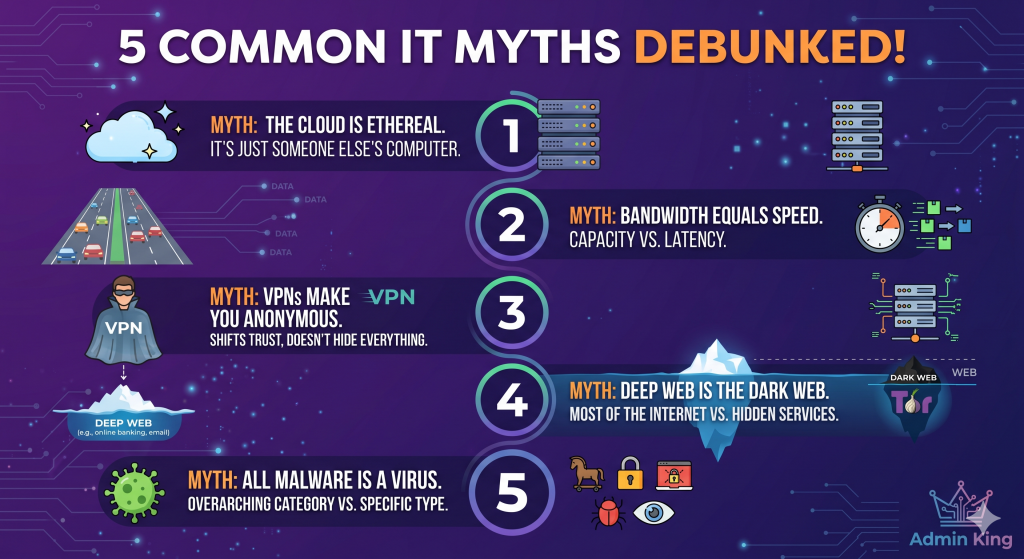
The Misconception: That data uploaded to “the cloud” exists in some decentralized, ethereal digital space hovering above us, completely safe from physical hardware failures. The Reality: There is no cloud. It is just someone else’s computer.
When you save a file to Google Drive, iCloud, or AWS, your data is traveling through fiber optic cables and being physically written to a spinning hard drive or SSD sitting in a massive, air-conditioned server farm.
2. Bandwidth vs. Speed
The Misconception: Paying your ISP for a “Gigabit” connection means your internet will be physically “faster” and lower your gaming lag. The Reality: You are paying for capacity, not velocity.
Think of your internet connection like a highway.
Speed (Latency/Ping): How fast a car can drive from your house to the server. This is governed by physical distance and the speed of light.
Bandwidth: How many lanes the highway has.
Upgrading from a 100Mbps plan to a 1Gbps plan does not make the cars drive faster; it just adds more lanes. If you are downloading a massive 100GB video game, those extra lanes allow more data packets to arrive simultaneously. However, if you are just loading a basic webpage or playing a competitive shooter, a 1Gbps connection will feel exactly the same as a 50Mbps connection because you aren’t using all the lanes anyway.
3. VPN (Virtual Private Network)
The Misconception: A VPN makes you completely invisible and anonymous on the internet, allowing you to do whatever you want without being tracked. The Reality: A VPN does not grant absolute anonymity; it simply shifts who you are trusting with your data.
Without a VPN, your Internet Service Provider (ISP) can see every website you visit. When you turn on a VPN, your traffic is encrypted inside a tunnel and routed through the VPN’s server. Your ISP is now blind, but the VPN provider can now see everything.
4. The Deep Web vs. The Dark Web
The Misconception: These terms are used interchangeably by the media to describe hidden, illegal hacker marketplaces where cybercriminals operate. The Reality: The Deep Web is incredibly boring, and you use it every single day.
The Surface Web: Anything that can be indexed and found by a search engine like Google or Bing (like Wikipedia or this article).
The Deep Web: Anything behind a login screen or paywall that search engines are blocked from indexing. Your private Gmail inbox, your online banking dashboard, and a hospital’s intranet are all part of the “Deep Web.” It makes up roughly 90% of the entire internet.
The Dark Web: A tiny, specific subset of the internet that requires specialized routing software (like the Tor browser) to access. While it does host illicit marketplaces, it is also used by journalists, whistleblowers, and citizens in oppressive regimes to communicate securely without state surveillance.
5. Virus vs. Malware
The Misconception: Any malicious software that infects your computer is a “virus.” The Reality: “Malware” is the overarching category, and a “virus” is just one very specific (and largely outdated) type of it.
Malware (Malicious Software): The umbrella term for any code written to do harm.
Virus: A specific type of malware designed to infect legitimate files and physically replicate itself by spreading from file to file, much like a biological virus.
Ransomware: Malware that encrypts all your data and demands a cryptocurrency payment for the decryption key.
Trojan: Malware disguised as legitimate software (like a fake PDF reader) that tricks the user into installing it, opening a backdoor for attackers.
Knowing the difference changes the troubleshooting approach. You don’t “clean” ransomware the way you clean a virus; you wipe the system and restore from your offline backups.